On-call rotation schedules for teams in Slack
Create daily or weekly rotations, preview handoffs, and manage coverage changes in Slack. Start a 14-day trial with no credit card required.
Requires a paid Slack plan with user groups. Your workspace admin may need to approve installation and user-group access.
Illustrative example
Three people. One weekly rotation.
Weekly handoff: Monday at 09:00 UTC
-
Week 1
Alice
Monday 09:00 → next Monday 09:00 UTC
-
Week 2
Ben
Monday 09:00 → next Monday 09:00 UTC
-
Week 3
Casey
Monday 09:00 → next Monday 09:00 UTC
Your published rotation, inside Slack
View full-size screenshot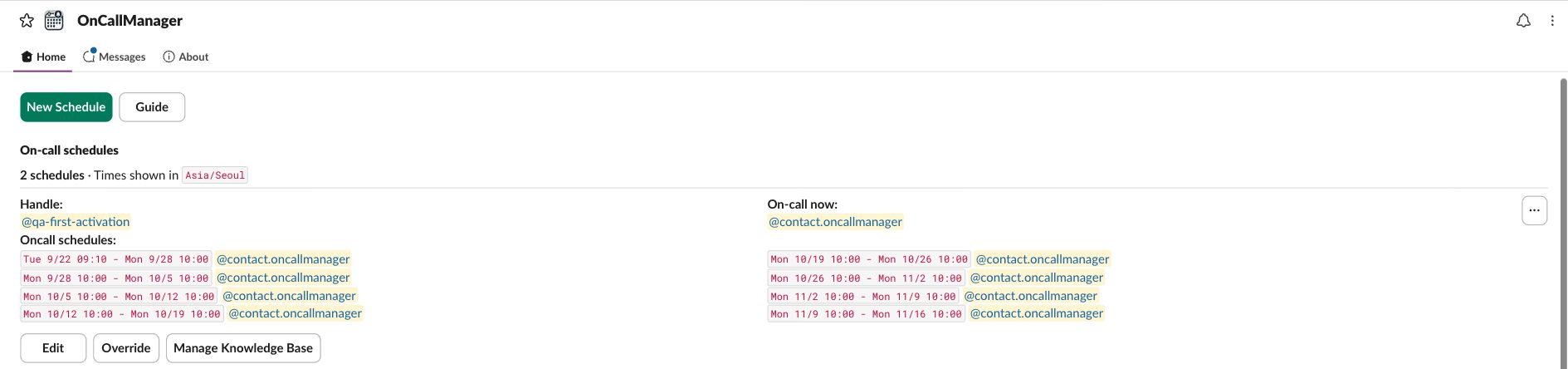
Keep on-call ownership clear through every handoff
OnCallManager is built for the practical job: recurring schedules, shift changes, reminders, and visible on-call ownership in Slack at a predictable price.
Slack first
The team uses the app inside Slack instead of context-switching to a separate dashboard for basic rotation work.
Rotation changes stay accurate
Overrides and swaps update the real on-call owner so Slack stays aligned with what is actually happening.
Predictable price
Flat-rate pricing avoids the “every new engineer makes the tool more expensive” problem.
Create your first Slack on-call rotation in one focused setup
Start with one rotation. You can try it with yourself before adding the rest of your team.
Install the Slack app
Choose your workspace and review Slack’s permissions. Once approved, open OnCallManager’s Home tab in Slack.
Choose your responders
Click “Publish first schedule.” Start with yourself or use “Edit Users” to add teammates. Choose the cadence and group name.
Preview and publish
Review the responders, handoff times, and timezone in the preview, then click “Publish.” Your schedule appears in the Home tab.
The features teams expect from Slack on-call rotation software
Focused on the actual scheduling problem engineering teams need solved quickly.
Recurring rotations
Create daily or weekly schedules and keep handoffs consistent without manual rebuilding.
Overrides and swaps
Keep ownership accurate when vacations, coverage gaps, or shift changes happen.
Slack visibility
Make the current owner and future handoffs visible where the team already communicates.
Google Calendar sync
Add calendar visibility after install so responders can see shifts alongside the rest of their schedule.
Manual approach
What “Slack on-call rotation” often looks like before teams install a real tool
- Spreadsheets, calendar invites, and pinned Slack messages drift out of sync.
- Schedule changes require someone to manually update multiple places.
- People still ask who is on-call because the source of truth is unclear.
OnCallManager approach
Keep Slack as the place where on-call ownership is actually visible and usable
- Create a recurring rotation once and let the app keep the current owner current.
- Use overrides when the real world changes without losing the schedule structure.
- Start on a 14-day free trial, then stay on a flat $50/month plan after that.
Questions buyers usually have about Slack on-call rotation software
Yes, on a paid Slack workspace with user-group access. Install the app, open its Home tab, and click “Publish first schedule.” Review the preview and click “Publish.”
Yes. OnCallManager is strongest for small Slack-centric engineering teams that need clear ownership, recurring schedules, and easier coverage changes without enterprise-tool overhead.
Yes. Overrides are part of the core product flow so the active on-call owner stays accurate when the planned schedule changes.
Yes. Google Calendar sync is available after install, so you can keep the first setup simple and add calendar visibility next.
The plan is a flat $50/month for unlimited users and unlimited rotations, with a 14-day free trial and no credit card required to start.
Set up your first Slack on-call rotation and make ownership obvious
Add the app to Slack, publish the first recurring schedule, and give the team a clear current on-call owner without building process around spreadsheets.
Use the setup guide if you want a step-by-step walkthrough after install.